Help center
Passport photo FAQ
Snapassport turns a phone or camera photo into a checked passport or visa photo. These answers explain the process, what we check, camera upload, digital downloads, the USA-only mailed-print add-on, privacy, and why the price is lower than many photo shops.
Most common questions
These are the questions people usually ask before uploading or paying.
How long does it take?
Most photos are processed and validated in about a minute. You see the full report before paying anything.
When do I pay?
Only when your photo passes — or when you choose the AI fix for fixable issues. The validation report and preview are always free.
What does the AI fix do to my face?
Nothing changes about who you are. The included fix handles crop, background and lighting; the optional premium fix can also remove glasses glare and sunglasses, relax the expression, even out lighting, and clear harsh shadows, red-eye and background clutter. Every edited result is checked against your original face and rejected if your identity changes — and if it can't pass, you're automatically refunded.
What do I actually get?
An un-watermarked, spec-exact JPEG plus a print-ready PDF with one copy on a single 5×7 sheet.
Is my photo private?
Yes. Photos are stored privately and automatically deleted after 14 days. We never sell or share your images.
Are you affiliated with the government?
No. We are an independent tool that checks your photo against published government and ICAO requirements. We can't guarantee acceptance by any authority. We create a compliant photo only — not a passport or any official document.
Best photo tips
Start with a better source photo and the checker has more detail to work with.
What is the best way to take the photo?
Have someone else take it from about head height. Face the camera straight on, stand against a light plain background, keep a neutral expression, keep your eyes open, and remove hats and glasses unless your document rules require an allowed head covering.
What should I avoid?
Avoid selfies from a low or high angle, heavy shadows, bright glare, tinted glasses, hats, hair covering the eyes, filters, screenshots, and busy backgrounds. A clean, sharp, evenly lit original gives the best result.
Does the background need to be perfect?
A light, plain background is best. We can replace or clean the background in many cases, but a simple wall with even light gives the most reliable edges around hair and shoulders.
Process
What happens from upload to finished file.
Do I need to choose the document before uploading?
No. You can upload first and choose the passport or visa type afterward. If you already know the document, you can also start from the document picker.
Can I use a normal phone photo?
Yes. A clear phone photo is usually fine, especially if someone else takes it at head height. Face the camera, use even light, keep your head and shoulders in frame, use a clean neutral background when possible, and avoid hats, glasses, shadows, glare, and filters.
What happens after I upload?
We rotate and prepare the image, find the face, crop it to the selected document size, clean the background where allowed, run the checks, and show you a pass/fail report with a preview so you can see whether the photo is valid before paying.
Can I try again if my first photo fails?
Yes. The report tells you what went wrong, and you can upload another photo without paying for the failed attempt.
Do you submit the passport or visa application for me?
No. We make the photo file. You still submit your application through the relevant government, consulate, or visa service.
Our technique
How the photo is prepared, in plain language.
How do you make the photo fit the official size?
Each document has its own size and head-position rules. We use those rules to place the face correctly, set the crop, and render the final JPEG and print sheet at the required dimensions.
What does the automatic fix change?
The standard processing focuses on crop, size, background, brightness, and color. It is designed to make the photo meet the selected document spec without changing who you are.
Does AI change my face?
No. We reject edits that change identity. The fix is meant to correct photo problems, not facial features.
Why do you show a report before payment?
Because you should know what passed, what failed, and whether a usable photo is possible before you pay. The report and preview are free.
What is the optional premium result?
Premium is for tougher photos or a more polished finish. It can attempt small compliance fixes such as glare, harsh shadows, uneven color or lighting, expression, pose, and background cleanup. You choose it only after the app has prepared and checked the premium result.
Checks we run
The report is built from government-style photo requirements and ICAO-based quality checks.
What kinds of checks are included?
We check for a clear single face, correct head size, eye position, centered crop, forward-facing pose, open eyes, closed mouth where required, sharpness, exposure, shadows, background, color, and document-specific dimensions.
Are the checks the same for every country?
No. Some rules are shared, but each supported document can have its own size, background, head-height, and output requirements.
Can you guarantee government acceptance?
No independent photo service can guarantee final acceptance. The issuing authority makes the final decision. We check against published requirements and refund automatically if our fix cannot make a paid photo pass our validation.
What failures usually require a new photo?
A missing face, multiple people, a very blurry or tiny face, blocked facial features, or a photo that is not a real photo of the applicant usually needs a retake.
Do warnings block the download?
Warnings call out things worth reviewing, but they do not always block a passing result. Failures are the issues that must be fixed or retaken.
Delivery and product
What you get after payment.
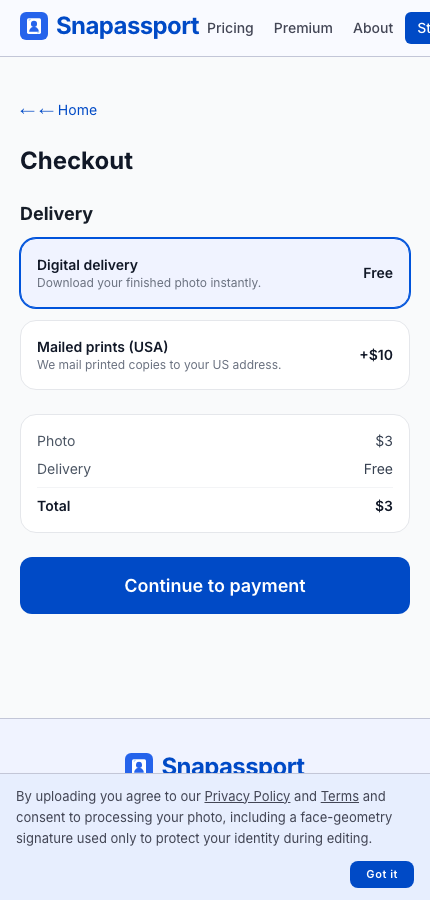
Choose digital or mailed prints at checkout
The checkout flow shows digital delivery first and a USA mailed-print option as a separate delivery choice.
What files do I receive?
You receive an unwatermarked JPEG made to the selected document spec and a basic print-ready PDF. For most passport-photo specs, the basic PDF is one copy on a 5×7 sheet.
Can I use the JPEG for an online application?
Yes, if the application accepts uploaded photo files for that document. Use the JPEG for digital upload and the PDF when you want to print.
Where can I print the PDF?
You can print it at home if your printer is accurate, or use a local print shop or pharmacy photo kiosk. Print at actual size; do not fit or scale the page.
Can I choose the print-sheet size?
Yes, with the print pack or a premium-grade order. The picker uses the sizes available for the selected document, commonly 5×7 inch print, 4×6 inch print, and A4 print, and lets you choose how many copies fit on the sheet with cut lines.
Can you mail printed photos to me?
Yes, in the United States. After checkout, the mail-delivery add-on is $10 and the current product mails 6 printed photos on a 5×7 sheet to a US address.
Do I need an account to download?
No account is required for a normal order. Your browser session gives you access to the download after payment.
How long are downloads available?
Photo files are temporary and are automatically deleted after 14 days, so download your files soon after purchase.
Privacy and security
How we handle photos and payment information.
How long do you keep my photo?
Uploaded and generated photo files are automatically deleted from our service within 14 days.
Do you sell or share my photo for advertising?
No. We do not sell your photo, use it for advertising, or share it for cross-site ad targeting.
Do you store my card details?
No. Card payments are handled by Stripe. We never see or store your full card number.
Why do you measure my face?
We measure face position and proportions to check passport-photo rules. We also compare an edited result against the original so the edit does not change your identity.
Can I delete my photo sooner?
The automatic deletion window is short by design. If you need help with a specific order, contact us from the same browser or include your order details.
Camera and upload
Tips for taking a photo that gives the checker enough detail.
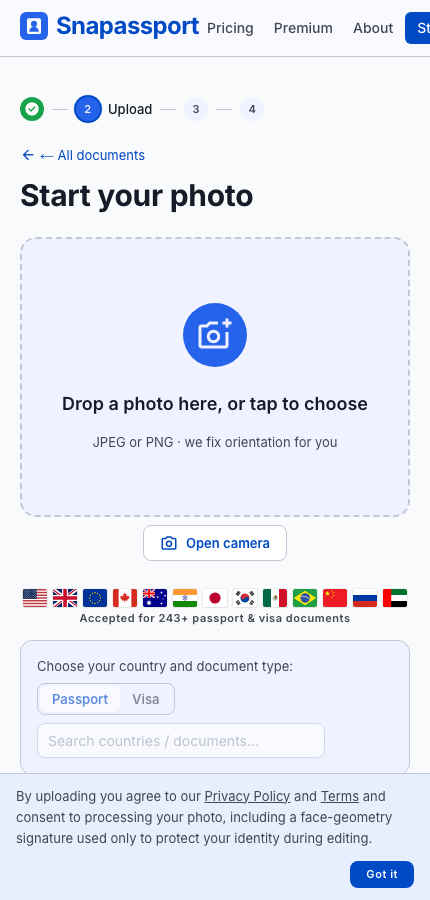
Upload or open the camera
On supported browsers, the upload card includes an Open camera button. The live camera view gives framing prompts and a fallback to file upload.
How does the camera upload work?
If your browser supports camera access, the upload card shows an Open camera button. The live camera view gives framing and pose prompts, can count down automatically when your face is aligned, and also has a manual Take photo button. If camera access is blocked, you can upload a file instead.
When is a file upload better than the live camera?
Use file upload when someone already took a sharper photo, when your browser blocks the camera, or when you want to choose from your photo library. The checker runs the same validation either way.
Can someone else take the photo for me?
Yes. That often works better than a selfie because the camera can stay farther away and level with your face.
Can I use a selfie?
Sometimes, but selfies often have perspective distortion, uneven lighting, or a camera angle that is too high or low. For best results, ask someone else to take the photo at head height.
What file types can I upload?
Common image formats from phones and cameras are supported, including JPEG and PNG.
Pricing and refunds
Why the price is lower and when refunds happen.
Why are you cheaper than pharmacy and photo-shop providers?
The base process is automated, online, and self-serve. There is no store counter, appointment, camera operator, or mailed print bundle included in the base digital price.
Why are you cheaper than some online passport photo tools?
We keep the base product narrow: a checked digital JPEG and basic print-ready PDF at a flat price, with the report shown before payment. Premium cleanup, richer print sheets, pickup, and US mailed prints are separate options instead of hidden in the base price.
Do I pay for failed uploads?
No. You can upload, see the report, and decide what to do before paying.
When do refunds happen?
If you pay for an AI fix and we cannot make the photo pass our validation, the order is automatically refunded.
Are printed photos mailed to me?
Not with the base digital product. If you choose the USA mail-delivery add-on, printed photos are mailed to a US address for an extra $10.
Ready to check a photo?
Upload is free. You see the report and preview before deciding whether to download.
Start with my photo